CI / Actions
rickub runs your continuous-integration workflows automatically. Add a workflow file, push, and watch it run.
Add a workflow
Create a YAML file under .github/workflows/ in your repository. On the next push, rickub picks it up and runs it. You may instead keep rickub-native workflows in .rickub/workflows/, which takes precedence: if that directory exists, rickub reads workflows only from it and ignores .github/workflows/ entirely. A minimal workflow:
# .github/workflows/ci.yml
name: CI
on: [push]

jobs:
  test:
    runs-on: ubuntu-latest
    steps:
      - uses: actions/checkout@v4
      - name: Run tests
        run: |
          make build
          make test
Triggers
The on: key controls when a workflow runs — for example push, pull_request, or a manual, button-triggered workflow_dispatch. A workflow_dispatch can be asked for from the Run workflow form on the Actions tab, the REST API, or MCP — with one exception: a deploy gate's break-glass override (the override-input: of a needs-workflows: job) is a signed-in human's act and is accepted only from the Run workflow form. The API and MCP refuse it with breakglass_refused, so a script or an agent holding an admin token cannot skip the deploy gate; an admin has to tick the box themselves. See migrating from GitHub for the gate itself.
The wired set is pull_request, push, release, schedule, workflow_call and workflow_dispatch; any other on: verb (issue_comment, pull_request_target, workflow_run, merge_group, …) parses but never fires. The Actions tab names the workflows carrying unwired verbs — with the verbs — so an inert trigger is never silent, and every run of a mixed workflow (on: [push, workflow_run]) repeats them on its run page. The migration guide's trigger table is pinned to the parser's own event set by a test, so it cannot drift.
Jobs and steps
A workflow has one or more jobs; each job runs a series of steps. A step either runs a shell command (run:) or uses a reusable action (uses:). Jobs run on a fresh runner each time.
Secrets & variables
Store sensitive values as secrets and non-sensitive configuration as variables, at the repository or organization level, under Settings → Secrets and Settings → Variables. Reference them in a workflow:
steps:
  - name: Deploy
    run: ./deploy.sh
    env:
      API_TOKEN: ${{ secrets.API_TOKEN }}
      REGION: ${{ vars.REGION }}
Secrets are write-only once saved and are masked in logs — never echo a secret or print it to the run output.
Push to your repository from a workflow
A workflow can commit and push back to its own repository — the pattern behind generated changelogs, version bumps, formatter fixes and scheduled data snapshots. You do not need a personal access token. Every job is handed a short-lived GITHUB_TOKEN scoped to that one repository, and the checkout's origin is already set up to use it, so a plain git push works:
name: Snapshot
on:
  schedule:
    - cron: "0 * * * *"

permissions:
  contents: write        # required — a job is READ-ONLY unless it asks

jobs:
  collect:
    runs-on: ubuntu-latest
    steps:
      - uses: actions/checkout@v4
      - run: ./collect.sh > data/latest.json
      - run: |
          git config user.name  "rickub-actions[bot]"
          git config user.email "actions@rickub.com"
          git add -A
          git diff --quiet --cached || git commit -m "chore: refresh snapshot"
          git push
Two rules decide whether the push is allowed, and both are the same ones GitHub applies:
- The workflow must declare
permissions: contents: write. A job that declares nopermissions:block is read-only, so its push is refused. - A job running a fork's pull request can never push, whatever it declares. Untrusted code is capped at read — exactly as a fork's
GITHUB_TOKENis on GitHub.
The bare git push above works because a job for a branch is checked out on that branch, with its upstream set. A job for a tag — or for a fork pull request's merge ref — is checked out with a detached HEAD, exactly as on GitHub: there is no branch such a build belongs on. Pushing from one of those jobs needs an explicit target, e.g. git push origin HEAD:refs/heads/main.
The token only ever reaches its own repository: a job cannot push to, or fetch from, any other repository with it. To write somewhere else you still need a credential for that repository, stored as a secret.
A push made with GITHUB_TOKEN does not start new workflow runs. That is deliberate, and matches GitHub: without it a workflow that commits its own output would trigger itself forever. Webhooks still fire for the push. If you genuinely need the push to start another workflow, push with a token belonging to a user (a PAT stored as a secret) — and be sure you have thought about the loop.
View runs & logs
Every run appears under the repository's Actions tab. Open a run to see its jobs and steps and to stream the logs live as it executes.
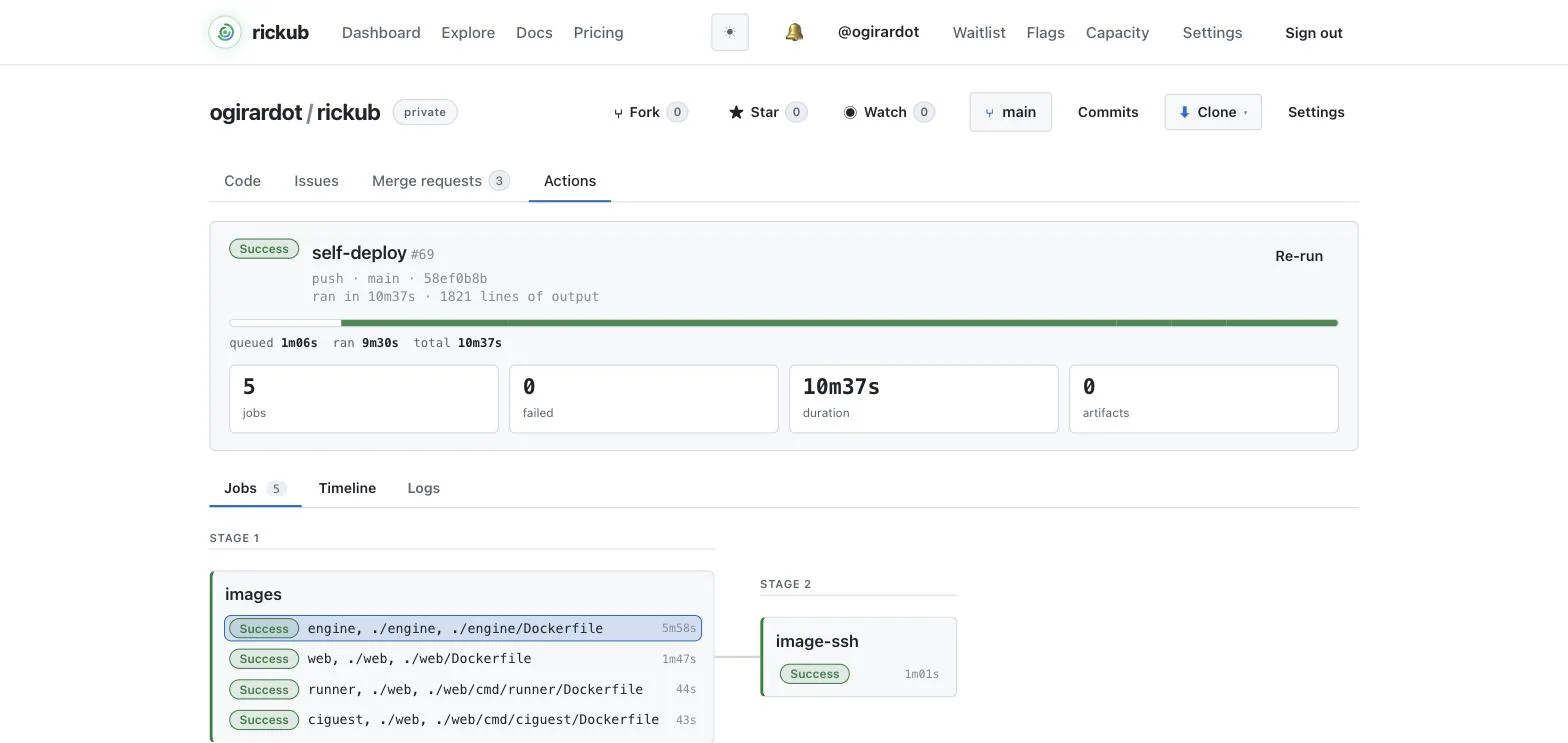
Live example: portal's Actions tab — run 4 is a green ci run on main, run 3 a red one you can open and read.
Re-run & cancel
Re-run a finished run to execute it again at the same commit — handy for flaky failures — and Cancel an in-flight run you no longer need. Both are available from the run page and from the CLI (rickub run rerun, rickub run cancel).
Retry a step on network errors
A step that downloads things — go mod download, docker build pulling a base image, npm ci — can fail on a one-off network error that has nothing to do with your change. retry: runs such a step again, only when its failure was network-class:
# .rickub/workflows/build.yml
jobs:
  image:
    runs-on: large
    steps:
      - uses: actions/checkout@v4
      - name: Build
        run: docker build -t app .
        retry:
          attempts: 2     # total runs, the first one included (2 or 3)
          on: network     # the only class; may be omitted
- What counts as network-class. The step's own last 40 lines of output before it exited show one of:
connect: no route to host, a transfer cut mid-pack (fetch-pack: unexpected disconnect,fatal: early EOF), or an image pinned by digest (@sha256:…) reportednot found/manifest unknownby its registry. If those same lines also show a real failure — a failing test or a build failure from Go, Rust, pytest, Maven, Gradle or jest, a compile error, a coverage-gate verdict — the step is not retried. A compile error or a red test never runs twice. - The pause. The retry starts 15 seconds after the failed attempt, because these errors rarely clear within a second. The pause and the retry both count against the step's
timeout-minutes:; a step whose timeout fires is never retried. - What you see. The failed attempt's output stays in the log, followed by a warning annotation — attempt 1/2 failed with a network-class error (Network transient) — retrying in 15s — then the retry's output. A job that went green on a retry is visible as such on the run page. If the retry fails too, the job's failure reason is the last attempt's: a retry that gets past the network and then hits a compile error reads as that compile error, not as a network problem.
- Idempotence is yours. The whole
run:script runs again in the same workspace. Anything it appended the first time — to a file, to$GITHUB_OUTPUT,$GITHUB_ENV,$GITHUB_PATHor the step summary — is still there, and the retry appends again. Write retried steps so a second run is harmless (overwrite rather than append, or clean up first). - Only
run:steps. Auses:action step cannot declareretry:(its staging and post steps are not re-enterable) — that is a parse error. - Known limit. A digest that was really deleted or garbage-collected upstream looks exactly like a registry hiccup, so it is retried once and reported as Network transient on every run. If that label repeats on the same pinned digest, re-pin the image.
retry: is a rickub extension and works only in .rickub/workflows/. In .github/workflows/ it is a parse error, for the same reason as reports: below: those files must stay valid on github.com.
Test reports
A job can declare the test reports it produces, and rickub parses them into a Tests tab on the run page: which tests failed, the assertion that failed, the stack, and a per-suite breakdown — instead of scrolling a log looking for the word FAIL.
Nothing is re-executed. reports: names files your steps have already written: rickub matches the globs against the workspace after the last step and reads what is on disk. Your test command runs exactly once — in the step where you wrote it — and declaring a report adds no time to the job.
# .rickub/workflows/ci.yml
jobs:
  test:
    runs-on: ubuntu-latest
    steps:
      - uses: actions/checkout@v4
      - id: go                       # give the test step an id…
        run: go test ./... -json > report.json

    # a key on the JOB, not a step
    reports:
      go:                        # the report's name; several per job
        tests: report.json       # a glob, or a list of globs
        from: go                 # …and point the report at it
        format: go-json          # optional; inferred when omitted
      rust:
        tests: target/nextest/ci/junit.xml
        on-missing: warn         # warn (default) | ignore | fail
reports: is a rickub extension and works only in .rickub/workflows/. In .github/workflows/ it is a parse error, on purpose: those files are also meant to run on github.com, where reports: is invalid — silently accepting it here would hand you one file that behaves differently on the two hosts. Move the file to .rickub/workflows/ to use it. Creating .rickub/workflows/ is itself a switch: rickub reads workflows from one directory per repository, so the moment that directory exists every workflow still under .github/workflows/ is ignored — move them or delete the directory. See Migrating from GitHub Actions.
Because reports: is attached to the job rather than being a step, it is collected after the last step whatever the job concluded. That is the point of the design: everywhere else in this category the report is a step, and a failing test step skips it — which is why GitLab documents when: always, Jenkins post { always }, Azure succeededOrFailed() and dorny if: !cancelled(). Here there is nothing to remember.
The keys
tests:(required) — a glob or a list of globs, relative to the workspace, matching the report files. Several matches are merged into one report, so one file per package or per shard is fine.format:—junitorgo-json. Omit it and the format is inferred from the file's own contents, falling back to its extension.from:— theid:of the step that produced the report. The panel shows that step's ownrun:text on its meta line, so the command is written once and cannot drift from a retyped copy. An id the job does not declare is a parse error naming the id and the ones the job declares — a typo fails the run loudly instead of rendering a label that describes nothing. If bothfrom:andcommand:are given,from:wins.command:— a label shown on the panel's meta line. It is never executed: it is text describing a command that already ran, not an instruction to run one. It is the fallback for a report no single step produced (a composite action, a matrix leg) — preferfrom:whenever a step exists.time-unit:—seconds,millisecondsornanoseconds, for a producer whose durations do not follow its format's convention.on-missing:— what to do when the glob matches nothing:warn(the default — the run says so),ignore, orfail(the only way a report can change a job's conclusion).
What each format gives you
JUnit XML is the wire format because every language already emits it — pytest, Maven Surefire, Gradle, Jest, Vitest, gotestsum, cargo-nextest, PHPUnit, RSpec. There is no single JUnit schema (the three usually cited as authoritative contradict each other), so rickub parses the union leniently: every attribute is optional, no missing field ever loses a report, and every count is recomputed from the individual tests rather than trusted from the file's own totals.
- JUnit XML — suites, per-test durations, failure messages and stacks, skips, captured output for failures, and Surefire's rerun/flaky records. Producers disagree about the root element (Maven Surefire writes a bare
<testsuite>with no<testsuites>wrapper; pytest always wraps), and both parse.pytest'sjunit_familyhas defaulted toxunit2since pytest 6.1, and xunit2 drops thefileandlineattributes, so failures from it cannot point at a source line;junit_family=xunit1keeps them — see Python: pytest.cargo-nextestomits skipped tests unless you setreport-skipped, and rickub says so on the panel rather than showing a skip count of 0 as fact. go test -json— statuses, per-test durations (10 ms granularity) and the package as the suite. Go emits no structured failure field at all, so the assertion line is recovered from thefile_test.go:12: messageconvention; a test that fails without following it shows its first output line instead. Subtest output is attributed to the root test, asgotestsumalso does, because Go's own attribution is unreliable undert.Parallel.
Java: Maven and Gradle
Maven's Surefire plugin already writes JUnit XML — you do not add a step for it. It puts one file per test class in target/surefire-reports/, and the Failsafe plugin puts your integration tests in target/failsafe-reports/. Point tests: at both and the two arrive as one report per key:
# .rickub/workflows/ci.yml
jobs:
  test:
    runs-on: ubuntu-latest
    steps:
      - uses: actions/checkout@v4
      - uses: actions/setup-java@v4
        with:
          distribution: temurin
          java-version: '21'
      - run: mvn --batch-mode verify
        id: verify

    reports:
      unit:
        tests: target/surefire-reports/*.xml
        from: verify
      integration:
        tests: target/failsafe-reports/*.xml
        from: verify
        on-missing: ignore     # nothing to report if you run no IT classes
Neither key here sets format:: these are JUnit XML files and rickub infers that from their contents, so it is only worth spelling out for a producer whose output is ambiguous. Both use from: to point at the step that ran the tests, and the panel shows that step's own run: text — the command is written once, on the step, and the report cannot describe anything else.
A multi-module build writes one report directory per module. Use **, which matches any number of directories — including none, so the root module's own reports come along:
    # still the job's own key
    reports:
      unit:
        tests: "**/target/surefire-reports/*.xml"   # every module, at any depth
        from: verify
The two wildcards are different and both are useful: * matches within ONE path segment and never crosses a /, while ** stands for whole segments. So */target/surefire-reports/*.xml is exactly "the modules directly beside the root" — write that when you mean it, and ** when the nesting is deeper or you would rather not care. ** has to be a path segment on its own: **.xml is an error rather than a synonym for *.xml, and the run says so instead of quietly matching nothing.
A ** starting at the workspace root walks the tree, so it walks node_modules/ and every target/ on the way. The walk is capped and the run says so if it hit the cap — but naming a directory level (*/target/surefire-reports/*.xml) is both faster and more precise when you already know the layout.
Gradle is the same shape with a different path: the test task writes to build/test-results/test/, so tests: build/test-results/test/*.xml after a ./gradlew test step, or **/build/test-results/test/*.xml across a multi-project build.
Surefire is also the dialect that records retries. Run it with -Dsurefire.rerunFailingTestsCount=2 and an attempt that eventually passed is written as <flakyFailure>, while one that never did keeps a <rerunFailure> per attempt. rickub reads both. A <flakyFailure> counts as a pass — the test did pass — but the panel marks it flaky in its suite's case list, counts it on the suite header beside "passed", and says how many the report holds at the top, so a green run that only went green on a retry never looks like a clean one. A <rerunFailure> is still a failure, reported once with its retry count, not as three separate failures of the same test.
Python: pytest
pytest writes JUnit XML with --junit-xml (spelled --junitxml too — both are the same option). There is no plugin to install:
# .rickub/workflows/ci.yml
jobs:
  test:
    runs-on: ubuntu-latest
    steps:
      - uses: actions/checkout@v4
      - uses: actions/setup-python@v5
        with:
          python-version: '3.13'
      - run: pip install -r requirements.txt
      - id: pytest
        run: pytest --junit-xml=report.xml -o junit_family=xunit1

    reports:
      pytest:
        tests: report.xml
        from: pytest
The -o junit_family=xunit1 above is the whole point of this example. pytest's junit_family default changed to xunit2 in pytest 6.1, and xunit2 does not write the file and line attributes on <testcase> — the two things a failure needs to point back at the source line that produced it. Everything else survives; only the location is gone, and nothing warns you. Set it on the command line as above, or once in your config: junit_family = xunit1 under [pytest] in pytest.ini, [tool:pytest] in setup.cfg, or [tool.pytest.ini_options] in pyproject.toml.
Splitting the suite across shards? Give each one its own file (pytest --junit-xml=reports/${{ matrix.shard }}.xml) and point tests: at reports/*.xml — several matches merge into one report, with the counts recomputed from the cases rather than summed from the files' own totals.
Ingest is bounded and never fails your job: 10 MB per file, 25 MB per job, 10,000 tests per run, and 8 KB of failure text per test. Past any of those, rickub stores what fits and says on the panel that it did. Reports are kept for the newest 10 runs per job; a report's passing tests are dropped after a week, its failures are kept.
Status badges
Show the latest CI status in your README with a status badge image that links to the Actions tab.
CI-minute quotas
Each plan includes a monthly allowance of CI minutes — the compute time your runs consume. Usage resets every month; the allowance on each plan is listed on the pricing page.
On the Free plan, CI minutes and AI reviews are one pool per account: your personal namespace and every free organization you own draw on the same monthly allowance, so creating another organization does not add another one. A namespace on a paid plan has its own pool. Your usage page names the namespaces a figure counts.