nandi/oripublic Fork 0
main
Commits
Clone
git clone https://git.rickub.com/nandi/ori.git
git clone ssh://git@rickub.com/nandi/ori.git

Host key fingerprint (ed25519): SHA256:iycHnxEyq0Q7uyVpB7JlznP0G7JrTPXLYRcAU5CSLhc — verify it before your first connect.

forked from bots-garden/ori

🛟 Updated. 3d1f70c · on main · k33g · 13h ago
README.md · 51 lines · 1.8 KBmarkdown
Blame HistoryOpen raw

Ori

The origin from which many voices are called, and through which they are known

Ori is a web client for ACP (Agent Client Protocol) code agents: a Go backend serves a React single-page application and connects, over ACP, to an agent such as Claude Code. The browser gets a Zed-style agent panel — streamed answers, thoughts, tool calls, plans and permission prompts — plus a workspace panel: resizable file tree, syntax-highlighted previews (with rendered Markdown and AsciiDoc), a Monaco editor and an interactive terminal. Light and dark themes, switchable from the header.
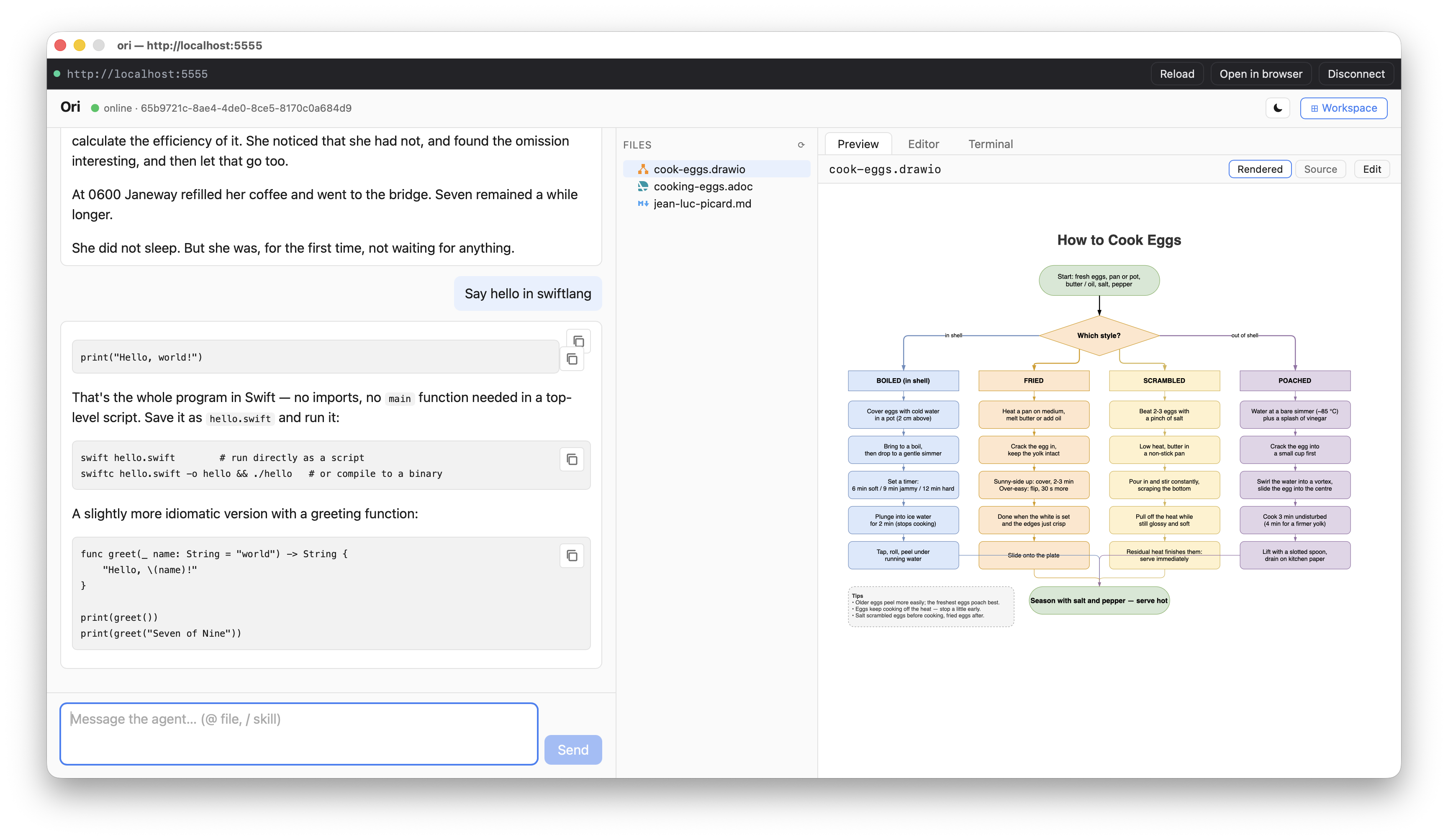
ori-desktop

Quick Start

sbx run -d claude . \
  --template k33g/ori:0.0.3 \
  --kit docker.io/k33g/ori-kit:latest \
  --name hello-world \
  -p 5555:8888/tcp

Then open http://localhost:5555 — the panel connects to a Claude Code session already running in the sandbox, no login needed.

Or you can use ori-desktop

cd ori-desktop
wails build
xattr -cr build/bin/ori-desktop.app

Then double-click on the application

How to start

From the directory where the kit lives, pointing at the project you want the agent to work on:

sbx run -d claude . \
  --template k33g/ori:0.0.2 \
  --kit ./kits/ori \
  --name hello-ori \
  -p 3000:8888/tcp

sbx run -d claude . \
  --template k33g/ori:0.0.2 \
  --kit https://rickub.com/bots-garden/kits/ori  \
  --name hello-ori \
  -p 3000:8888/tcp

Then open http://localhost:8888 — the panel connects to a Claude Code session already running in the sandbox, no login needed.

Documentation

Full documentation, in English and French, lives in docs/ — tutorials, how-to guides, reference (CLI, WebSocket protocol) and architecture notes.

 1
 2
 3
 4
 5
 6
 7
 8
 9
10
11
12
13
14
15
16
17
18
19
20
21
22
23
24
25
26
27
28
29
30
31
32
33
34
35
36
37
38
39
40
41
42
43
44
45
46
47
48
49
50
51
# Ori
> The origin from which many voices are called, and through which they are known

Ori is a web client for [ACP (Agent Client Protocol)](https://agentclientprotocol.com) code agents: a Go backend serves a React single-page application and connects, over ACP, to an agent such as Claude Code. The browser gets a Zed-style agent panel — streamed answers, thoughts, tool calls, plans and permission prompts — plus a workspace panel: resizable file tree, syntax-highlighted previews (with rendered Markdown and AsciiDoc), a Monaco editor and an interactive terminal. Light and dark themes, switchable from the header.

![ori-desktop](/bots-garden/ori/raw/main/assets/ori-desktop.png)

## Quick Start

```
sbx run -d claude . \
  --template k33g/ori:0.0.3 \
  --kit docker.io/k33g/ori-kit:latest \
  --name hello-world \
  -p 5555:8888/tcp
```
Then open **http://localhost:5555** — the panel connects to a Claude Code session already running in the sandbox, no login needed.

Or you can use **ori-desktop**

```bash
cd ori-desktop
wails build
xattr -cr build/bin/ori-desktop.app
```
Then **double-click** on the application

## How to start

From the directory where the kit lives, pointing at the project you want the agent to work on:

```bash
sbx run -d claude . \
  --template k33g/ori:0.0.2 \
  --kit ./kits/ori \
  --name hello-ori \
  -p 3000:8888/tcp

sbx run -d claude . \
  --template k33g/ori:0.0.2 \
  --kit https://rickub.com/bots-garden/kits/ori  \
  --name hello-ori \
  -p 3000:8888/tcp
```

Then open **http://localhost:8888** — the panel connects to a Claude Code session already running in the sandbox, no login needed.


## Documentation

Full documentation, in English and French, lives in [`docs/`](docs/README.md) — tutorials, how-to guides, reference (CLI, WebSocket protocol) and architecture notes.